In 2026, AI is no longer just a buzzword — it’s a daily work companion. From content creators and freelancers to business owners and students, everyone is using AI tools to save time, increase productivity, and scale their results faster than ever before. But with hundreds of new tools launching every month, one big question remains: Which AI tools actually work?
Not every trending tool delivers real value. Some look impressive in ads but fail during real-world use. That’s why I personally tested the most popular and talked-about AI tools of 2026 across different tasks — content writing, image creation, video editing, automation, coding, and business workflows.
In this blog, you’ll find only 100% tested and working AI tools — tools that are fast, reliable, beginner-friendly, and capable of delivering real results. Whether your goal is to grow your online business, start a side hustle, boost productivity, or simply work smarter, this guide will help you choose the right tools without wasting time or money.
Best AI Tools in 2026 – 100% Tested & Working
Free AI tools
If you’re looking for free AI options, good news! I’ve made sure to include only AI tools that you can try for free and without a credit card, so you can explore their features freely and without commitment.
The best AI assistants
ChatGPT

By now, everyone has heard of ChatGPT. Most of us use it daily for a wide variety of personal and professional tasks.
It remains my favorite AI assistant, although the alternatives on this list are now much stronger competitors than when ChatGPT was first launched.
One of my favorite features is the ability to upload and analyze files. At work, I often upload PDFs , spreadsheets, screenshots—you name it—and ask ChatGPT to summarize, analyze, or extract data from them. I recently uploaded a screenshot of a funnel analysis in Google Analytics, and it gave me some really useful insights into where we might be losing users. It was truly helpful.
I also used it to analyze a bunch of spreadsheets for this post . I uploaded raw survey data and immediately got clear trends, key findings, and even recommendations on the best types of charts to visualize them. It literally saved me hours of work.
ChatGPT is available for free, although free access has some limitations regarding the most advanced models. With the Plus plan—currently $20 USD per month—you get the full potential of the tool: advanced features, faster speeds, and complete access to the latest models.
Grok
Although Grok can be used as a standalone AI assistant, you’ll most likely see it in action directly within X (formerly known as Twitter).
I’m not entirely sure if its integration actually improves the platform experience. In many posts I read, there are comments from users tagging Grok to verify if what the author said is true. This is probably a positive thing overall—it helps hold people accountable and brings them closer to the truth—but it has also disrupted the natural flow of conversation on Elon Musk’s social network.
Grok is a very intelligent model, and the best part is that it operates with minimal censorship. It offers several reasoning modes, such as “Think,” which gives the model more time to process and refine its answers, and “Deep Search,” which performs internet searches in the style of a RAG (retrieval augmented generation) system.
That lack of restrictions is also reflected in its impressive ability to generate images, which makes it my favorite tool when I want to create images of celebrities, brands, or just a good meme.
You can try Grok for free with limited access, but to access the latest models and higher usage limits, you’ll need to subscribe to one of X’s paid plans: Basic, Premium, or Premium+.
Claude
Claude has established itself as one of the most popular AI assistants for programming tasks. While some of the tools on this list are starting to catch up, I think it’s still fair to say that most developers rely on it wholeheartedly. I’m not a professional programmer, but I do enjoy experimenting with code from time to time. When I do, Claude is usually my first choice.
One of its greatest strengths is that it writes clean, well-documented code and, even better, explains it in clear and understandable language. In my experience, the code it generates tends to be more reliable, with fewer errors such as made-up variables or broken logic, especially when compared to ChatGPT.
I also like how Claude communicates. The interaction feels collaborative, as if he’s solving the problem with me, rather than just giving me answers that I then have to correct or adapt.
You can use Claude for free, but if you need more capacity and advanced features, there are two paid options: the Pro plan, for USD 20/month, and the Max plan, which starts at USD 100/month and includes higher limits and early access to new features.
Gemini
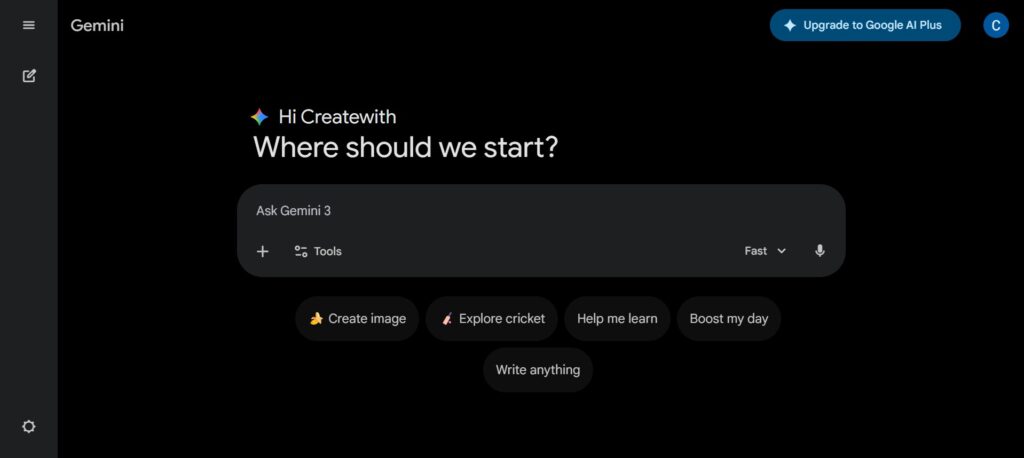
Gemini, Google’s AI assistant, currently holds the top spot in the LLM Arena rankings , a ranking based on millions of blind tests where users choose their preferred AI responses.
One of the main reasons I use Gemini is its impressive context window. This term refers to the amount of text the AI can remember and process within a single conversation. The larger the window, the more information you can provide and query. The latest Gemini models support over 1 million tokens, meaning I can upload a lengthy academic article and ask it multiple detailed questions without missing a single detail.
Another feature I love is Gemini’s audio summary. With it, I can upload a document and get a five-minute podcast-style audio summary narrated by AI voices. It’s perfect for making the most of long commutes and reviewing documents without having to read them.
Gemini offers a free plan with basic AI tools, while the paid Pro and Ultra plans provide access to more advanced models, creative features, and increased storage capacity. Prices start at $19.99/month for Pro and $124.99/month for Ultra.
The best AI video generators
Synthesia
Synthesia is the leading AI-powered video generator that lets you create videos with realistic AI avatars . I’ve used it to create training modules and presentations, and it’s clear why it’s a favorite among learning and development teams . By turning text into video , Synthesia simplifies the production of high-quality content without the need for cameras, microphones, or studios.
Its most popular use case is undoubtedly for training videos , but Synthesia is versatile enough to meet a wide range of needs. Companies use it for internal communications, new employee onboarding, and creating customer support videos or knowledge base content. In marketing, it excels at producing custom videos for sales communications, B2B marketing content, explainer videos , and even product demonstrations.
Personally, I also found it very useful for website videos that needed a polished, professional touch with minimal effort. Synthesia is super easy to use; you just write the script and ask it to generate the video .
Two things I love about Synthesia are the ability to customize avatars and the wide variety of templates it offers. When I needed to create custom training videos for different departments, Synthesia allowed me to easily adapt the avatar’s language, tone of voice, and background visuals to suit the target audience. With its library of over 240 digital avatars and support for more than 140 languages, you can effortlessly create globally consistent content.
Synthesia offers a free plan that allows users to generate up to 36 minutes of video per year, with no credit card required. For access to more features, paid plans start at $29 per month.
Google I See
Google’s Veo is an impressive tool for generating creative videos with AI, capable of producing images for almost any situation, although its content moderation system is quite strict.
Personally, I primarily use Veo to create complementary visuals in social media marketing videos. Veo 2 is quite affordable, and while it occasionally produces odd results in action scenes, it offers some of the most realistic physics I’ve seen in AI-generated videos.
Veo 3 is more expensive, but it also adds the ability to generate audio, which makes it significantly more useful in my opinion.
You can try Veo 2 for free on Google AI Studio, where there are a limited number of free trial credits available.
To access Veo 3, you’ll need the Google AI Pro plan at $19.99/month or the Ultra plan at $249.99/month. Alternatively, you can sign up for free at Synthesia and generate Veo 3 clips for free.
OpusClip
OpusClip is an excellent tool for breaking down longer videos into short, shareable clips for social media. It’s easy to use and does much of the heavy lifting.
The AI feature is surprisingly effective at finding the best parts of a video, so I didn’t have to spend hours reviewing the footage. It also automatically resized my clips to fit platforms like TikTok and Instagram.
Adding subtitles is quick and easy, and the option to include emojis makes clips feel more dynamic—ideal for grabbing attention when people are browsing without sound. I also really liked the feature that selects the most engaging moments to kick off the clip with impact.
With Opus Clip, I can easily transform my videos into engaging social media content. It’s a fast and efficient tool that simplifies the entire editing process.
The best AI image generators
Nano Banana
Play
Google’s Gemini Flash 2.5 image model, better known as Nano Banana, is amazing. It’s easy to use and incredibly fast, and it lets you do almost any edit you want to make to an image.
I’ve been using it to create videos: I generate a video in Synthesia, download it as an MP4, and take a screenshot of the first frame. I upload that to Nano Banana and write a command—for example, “add a yellow helmet and a high-visibility jacket.” It then generates the new image, and the edits are almost always exactly what I asked for.
Next, I ask him to change the background of my image to a busy construction site without distorting the subject (the presenter in the middle of the shot). From there, I animate the edited image back into a video using Runway’s Act Two. It takes a bit of trial and error, but the end result is smooth and realistic.
Simply put, Nano Banana covers almost every type of image editing you could possibly need. It can handle quick touch-ups and background changes, adding text, and even complete scene transformations. Some popular use cases include turning selfies into 3D figures, trying out new outfits or hairstyles, redesigning rooms, and reimagining photos in entirely different styles.
GPT-4o
Remember when everyone was generating Studio Ghibli-style AI images of themselves, their pets, and anything else they could think of? That was all powered by the built-in image generation in ChatGPT-4o.
It can convert text and images into new content with various artistic styles, so I’ve found it useful for many different tasks. Personally, I use it to create royalty-free images for blog posts and social media posts, and now that it can reliably generate text within images (something tools like DALL·E 3 struggled with), it’s even more valuable.
The feature is available in the free tier of ChatGPT, although there are daily usage limits. You can remove those limits by upgrading to a Plus or Pro plan.
Midjourney
Midjourney can be considered the original of AI image generation. It has been around since early 2022 and is still frequently preferred for its painterly aesthetic and its ability to generate base images used in creating videos from images.
To be honest, I mostly use the image tools built into my favorite AI assistants, like ChatGPT or Gemini. But when I want to create something truly beautiful, I use Midjourney.
One drawback is that Midjourney no longer offers a free plan; you have to subscribe to a paid tier to generate even a single image. There are four plans available, starting at $10 per month, with higher tiers offering longer generation time and advanced features, such as video support and a private creation mode.
The best AI meeting assistants
Fatom
Fathom may have appeared in a work call; it’s one of the AI tools I use most in my day-to-day life.
It’s an AI-powered note-taker that joins your Zoom or Microsoft Teams meetings, records the entire conversation, and keeps track of who said what during the meeting. If I forget an action item, need to review an explanation, or simply want to double-check what someone said, it’s incredibly useful.
Along with a full transcript, Fathom generates a clear and structured summary. In my experience, the notes are consistently accurate and well-organized.
The app is free with some limitations. Premium plans start at $19/month and grant access to unlimited AI features and deeper integrations. For what it offers, especially how accurately it captures questions and action points, it’s hard to beat.
It’s one of those tools that makes you wonder how you ever worked without it.
Making Money with AI: Best Methods for 2026
Nyota
While Fathom is a solid free option, Nyota aims for a higher level, with a more refined design and advanced features. Like Fathom, it records your meetings and generates AI-powered transcripts and summaries. But Nyota goes a step further by automating the typically time-consuming follow-up tasks after a call—for example, data entry and CRM updates based on what was discussed.
That means I can have a call with a potential client and, without lifting a finger afterward, receive a complete summary and see my CRM updated with the key points of the conversation. Honestly, it feels like magic.
Of course, these extras come at a cost. Nyota is a paid tool, though it offers a 7-day free trial. Prices start at $12/month for individual users, $39/month for small groups, and $89/month for larger groups, and it also offers custom pricing for businesses. Higher-tier plans offer more meeting hours and access to advanced features.
The best AI automation tools
n8n
n8n lets you automate tasks that are boring, repetitive, or simply take too long. It might seem a little intimidating at first, but I found it surprisingly easy to use once you get the hang of it.
To create an automation in n8n, you connect applications and services in a visual workflow. It’s simply a matter of dragging and dropping nodes; it’s a very intuitive setup.
No programming knowledge is required to create useful automations. But if you do know how to program, n8n gives you the flexibility to add custom features and delve deeper into automation to suit your needs.
One of the workflows I set up performs a daily backup of important data to a Google Sheet. Here’s how it works:
Activator: every day at 6 a.m.
Data retrieval: extracting records from an internal SQL database
Google Sheets: Adding data to my spreadsheet
It runs in the background and saves me time every morning.
n8n’s pricing starts at USD 20/month for 2,500 runs and basic features. The Pro plan (EUR 50/month) adds more workflows, faster execution, and management tools. Enterprise plans offer full customization and support, with on-demand pricing.
Manus
I’ve experimented quite a bit with Manus, and I must say it’s a truly impressive tool. It’s an AI agent that can perform a wide variety of tasks: from creating presentations and analyzing data to generating images and videos, building websites, and carrying out programming tasks. It achieves this by combining different Language Models (LLMs) and other types of specialized models to execute your requests.
I tested it on several projects, including research into the causes of the 2008 global financial crisis, followed by the creation of a financial blog to publish that information. The final result included HTML, CSS, and JavaScript files, as well as the necessary visual resources for the site. I found the site surprisingly professional.
Compared to other AI agent products (like ChatGPT’s Operator feature), I think Manus offers a more robust experience. It performed the tasks I asked it to more accurately, and the quality of the results was superior.
Manus offers a generous free plan, providing 300 credits daily and access to basic features. Paid plans start at $16/month and grant access to more credits, advanced models, and multimedia content generation.
The best AI research tools
In-depth research
OpenAI’s in-depth research feature can search, analyze, and synthesize hundreds of online sources to create a comprehensive report on any topic you want, all in a matter of minutes.
Although I suspect the most common use case is for students to cheat on assignments, it’s actually an excellent tool for expanding your knowledge on any topic that sparks your curiosity.
At work, I primarily use it for market and competitor research, or to summarize industry trends. But my favorite use is analyzing public opinion. If you ask something like, “What are Reddit users saying about [your company]?”, you’ll get a very useful snapshot of how your brand is being discussed in online communities.
The reports may take a little while to generate, but that’s understandable, considering the number of sources they include.
Free ChatGPT users get 5 in-depth research tasks per month. Paid plans get more: Plus, Team, and Edu receive 10, while Pro users get 125.
NotebookLM
The last time I used NotebookLM was to study for an exam. I uploaded a bunch of notes and course materials, and it gave me a really clear and helpful overview of everything. The best part is the audio summary feature: it turns your content into an AI-generated podcast that really helps you retain the key points.
It’s not perfect: you have to double-check things from time to time, but it does a great job organizing complex material and makes it easier to understand. Honestly, I couldn’t believe it was free.
The free tier of NotebookLM gives you up to 100 notebooks and 50 fonts per notebook, with daily limits on queries and audio summaries. If you need more, the $19.99/month AI Premium plan includes 500 notebooks, 300 fonts each, higher usage limits, and access to Gemini Advanced. Students with a .edu email address can access the premium version for free.
The best AI-powered writing tools
You can try Synthesia for free
Join a community of over 1 million users today and start making AI-powered videos by choosing from over 240 avatars and over 140 languages.
Rytr
The big question with any AI writing tool is: why use it instead of ChatGPT or another general assistant?
Rytr is an AI-powered writing assistant designed to generate fast, polished content, especially for short-form tasks such as social media posts, product descriptions, and email drafts.
Compared to ChatGPT, Rytr offers a more specialized and optimized experience specifically for writing tasks. ChatGPT is excellent for brainstorming and exploring concepts, while Rytr excels when you need something formatted, professional, and ready to use with minimal tweaking or revisions. It also includes a built-in plagiarism checker for added peace of mind and supports over 30 languages, making it ideal for creating multilingual content.
Their library of over 40 pre-designed templates helped me get started faster, especially when I wasn’t sure how to structure a piece.
That said, Rytr struggles with longer or more complex writing, so I wouldn’t recommend it for in-depth articles. But for quick, high-quality content, it’s fast, effective, and affordable, starting at just $9/month. If you’re a freelancer, marketer, or small business owner looking for a streamlined, user-friendly, and effective writing tool, Rytr is a very solid option.
sudowwrite
I’m an amateur novelist in my spare time, so I included this tool on the list.
I’ve used Sudowrite as a creative writing assistant, and it’s an excellent tool for anyone working in fiction. It’s great for overcoming writer’s block, generating new ideas, and creating more vivid narratives.
Features like “Describe,” which helps create engaging descriptions, and “Brainstorm,” which generates creative plot points, significantly improved my storytelling process. The “Expand” feature is also useful for turning rudimentary outlines into fully developed drafts.
Unlike ChatGPT or Rytr, Sudowrite isn’t designed for creating emails, product descriptions, or blog posts. It focuses entirely on fiction: helping you write better dialogue, build richer characters, and refine your narrative structure. For example, when I got stuck on a scene, Sudowrite gave me excellent suggestions for improving pacing and tension. It’s the ultimate weapon against writer’s block: even if you don’t end up using its suggestions, it will make you think about the next sentence in a different way.
While not ideal for business or technical writing, it’s great for novels, short stories, or anyone looking to experiment with creative projects. With plans starting at $19/month, Sudowry offers a unique way to improve your fiction writing.
The best AI-powered search engines
Google’s AI Mode
You’ve probably seen Google’s “AI Summaries” appear in search results. In my experience, they’re a mixed bag: sometimes helpful, but often superficial or simply inaccurate.
Even so, Google seems determined to redefine the way we search, and has intensified its new “AI Mode”, which basically combines “Gemini” with traditional search.
For answering simple informational questions, I think it’s a big improvement compared to having to click through several pages to find a specific detail.
Where it struggles is with more nuanced or niche queries. Because large language models generate answers based on statistical patterns from their training data, you often end up with a “most likely” answer rather than one that’s surprising or original. Traditional search, on the other hand, can lead you to that obscure blog or forgotten forum thread that completely changes your perspective.
AI mode is currently free and available as a tab in the main Google search interface, but I wouldn’t be surprised if it soon becomes the default. When that happens, we’ll probably all miss the good old blue 10 links.
Perplexity
Although ChatGPT search and Google’s AI mode have stolen some of the limelight from Perplexity, and Apple is now rumored to be considering acquiring the company, I still turn to Perplexity when I want quick, reliable answers with clearly cited sources that I can actually verify.
What makes Perplexity more reliable is precisely that: the ability to verify the source of each piece of information. In contrast, Google’s AI mode is perceived as a black box: it’s often unclear which source each part of the answer comes from.
The free version is great for occasional use, but if you rely on Perplexity for deeper research, the Pro plan is a worthwhile upgrade.
ChatGPT Search
ChatGPT’s search function is now almost imperceptible in my daily use of the platform; when I ask questions, it often automatically performs a web search without me having to give any special instructions. That said, it is still available as an explicit option when you select “Search the Internet” in the suggestions box.
Similar to Google’s AI mode and Perplexity, when I ask a question, I receive a concise answer instead of a list of links. Furthermore, it feels more like a conversation: it remembers my previous questions and follows up in context, allowing me to delve deeper into a topic without having to rephrase my query each time.
I also love that there are no ads. Google’s AI mode will surely be flooded with ads soon, and traditional search is already so full of them it’s almost unbearable.
Another thing I really appreciate is the ability to customize the output. For example, if I want ChatGPT to explain something in simpler terms, I just have to ask. If I want the answer in a table or a CSV file, it can do that too.
ChatGPT search is now integrated into all ChatGPT plans, including the free plan.
The best AI-powered design tools
Canva Magic Studio
Canva is an extremely popular design tool, renowned for its ease of use, and with the addition of its AI-powered Magic Studio suite, it becomes even more powerful.
Magic Studio includes a variety of features that optimize and enhance the creative process.
Magic Design lets you enter a prompt or upload an image to generate custom templates for formats like social media posts and presentations. I often turn to it when I’m lacking inspiration, and it gives me a great starting point.
Magic Write helps you create content by generating text based on your instructions. I’ve found it especially useful for overcoming writer’s block and writing.
Magic Edit makes it easy to adjust images by changing colors or removing elements, perfect for quick edits without needing a more complex photo editing tool.
Magic Eraser enhances the experience, as it allows you to precisely remove unwanted objects from photos, something I have found especially useful when preparing images for social media.
Magic Animate adds movement to static designs, which has helped me create impactful presentations and social media content that really stands out from the rest.
Canva follows a freemium model. You can try some Magic Studio tools for free with limitations; for example, Magic Write can be used up to 50 times in total at no cost. By upgrading to Canva Pro (USD 15/month) or Canva for Teams (USD 30/month for every 3 users), the limit increases to 250 uses per person per month.
Looka
Looka is an AI-powered logo and branding design tool. I tested it on two of my side projects: one is an Airbnb property management company, the other a digital marketing agency.
It’s super easy to use. I simply entered my company name and a short description of what it does. Then, Looka showed me a bunch of sample logos and asked me to choose the ones I liked. This helped train the AI to match my style. After choosing a color palette, I got a range of AI-generated logos tailored to my business.
The quality was surprisingly high. Once I chose my favorite, I used the editor, which allowed me to make some minor adjustments simply by dragging and dropping the elements.
After I selected my favorite design, Looka generated a brand kit with my logo used on a variety of basic brand elements.
Looka offers two main pricing options: a one-off Premium logo package for $65, which includes high-resolution files, full ownership, and unlimited edits, or an annual subscription to the Brand Kit starting at $96/year, which adds branding assets such as social media posts, business cards, and more. For $129/year, you can also get a website included with the Brand Kit.
The best AI-powered app creators and programming tools
Lovable
Lovable is one of the fastest-growing startups in Europe, and it’s easy to see why. The idea of an app that allows anyone, regardless of their programming experience, to create software simply by providing a few instructions is incredibly appealing. And, surprisingly, it actually works.
To test it, I built several applications and websites of increasing complexity. It successfully generated both a portfolio website for a digital marketing specialist and a task manager-style productivity app. I also used it to generate a calculator widget for a client’s website landing page, and it delivered a fully functional mini-app that I could easily embed within iframe tags.
That’s what’s remarkable about Lovable: if you have no programming experience, it opens up a whole new world of possibilities on the computer… and makes your work look like genius.
That said, let’s be realistic. You’re not going to build a fully developed, enterprise-grade SaaS business with just pointers. That still requires thousands of hours of work from skilled engineers. But what’s exciting about Lovable isn’t just where it is today, but where it could go in the future.
Their pricing structure is simple: there’s a free plan for basic use, a Pro plan for USD 25/month with more features, and customized business plans for larger teams.
Cursor
If you have a more technical background and want more control over your code than an AI-powered app generator offers, Cursor is currently the most popular AI-powered IDE (Integrated Development Environment): the kind of tool development teams use to write and manage code. It’s quite fun to program alongside an AI.
I like using Cursor because it feels familiar; it’s a fork of VS Code, which is what I originally learned to program with, so there’s no learning curve.
I believe Cursor’s popularity boils down to two key strengths. First, it’s excellent for large projects; it understands dependencies and offers file-aware suggestions that actually make sense. Second, it has a solid grasp of development context, such as file structure, imports, and naming conventions, which means I spend less time debugged AI-generated code.
Another great advantage: the free version is generous. While the Pro plan (USD 25/month) gives you access to more advanced AI models and priority updates, the free version is more than enough for most everyday uses.
The best AI tools for knowledge management
Notion Q&A
Notion Q&A is a powerful tool that lets you access a company’s entire knowledge base through thousands of pages stored in Notion. I started using it at my new job, and it quickly became one of my favorite AI tools.
As an introvert, I loved being able to ask any question without interrupting anyone and instantly get a detailed and accurate answer, pulled from both our Notion workspace and all our Slack channels. It felt like having a personal assistant who knew exactly where to find the information in every corner of the company.
While my company has only connected Slack, Notion can also pull answers from other connected external tools, including Google Drive, Github, and Zendesk.
What makes Notion Q&A stand out, especially compared to Google Drive’s search function, is that it doesn’t just link documents. It provides direct answers pulled from the actual content, making it much faster to find what you need.
I also appreciate how it cites the source of each piece of information, making it easy to see the origin and verify key details. This has saved me countless hours when I needed quick, detailed information and needed to know its source.
Notion Q&A is offered as an add-on at a price of $10 per user/month (or $8/month when billed annually). It’s a fair price for what it offers, although it can become quite expensive for large teams. However, I think it’s worth it.
Guru
Guru is a dedicated knowledge management platform that offers similar functionality to Notion Q&A, but with one key difference: Guru presents answers directly in context. This means I can ask Guru questions within tools like Slack, my CRM, or anywhere it’s integrated, and automatically pull relevant information from those platforms. In practice, this makes the answers feel much more useful, as Guru has access to a broader set of real-time data.
Here’s how I see it: Guru is ideal for teams that need a comprehensive, integrated knowledge solution that fits seamlessly into their existing workflows. Notion Q&A, on the other hand, is a lighter, less commitment option, and it’s perfect if your team, like mine, already stores most of its content in Notion.
1 thought on “Best AI Tools in 2026 – 100% Tested & Working”